When building a Xamarin application one step is to build the Android APK file. This is a MsBuild step in TeamCity that looks like:
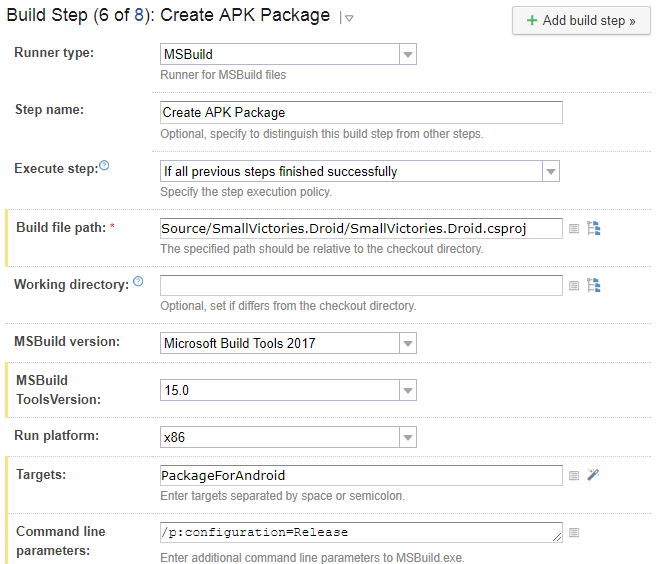
This step generates the following error:
[15:55:53][Source\SmallVictories\SmallVictories.csproj] CopyRealmWeaver
[15:55:53][CopyRealmWeaver] CopyRealmWeaver
[15:55:53][CopyRealmWeaver] Copy
[15:55:53][Copy] Creating directory "*Undefined*Tools".
[15:55:53][Copy] C:\BuildAgent\temp\buildTmp\.nuget\packages\realm.database\2.1.0\build\Realm.Database.targets(28, 5): error MSB3021: Unable to copy file "C:\BuildAgent\temp\buildTmp\.nuget\packages\realm.database\2.1.0\build\..\tools\RealmWeaver.Fody.dll" to "*Undefined*Tools\RealmWeaver.Fody.dll". Illegal characters in path.
[15:55:53][Step 6/8] Error message is logged
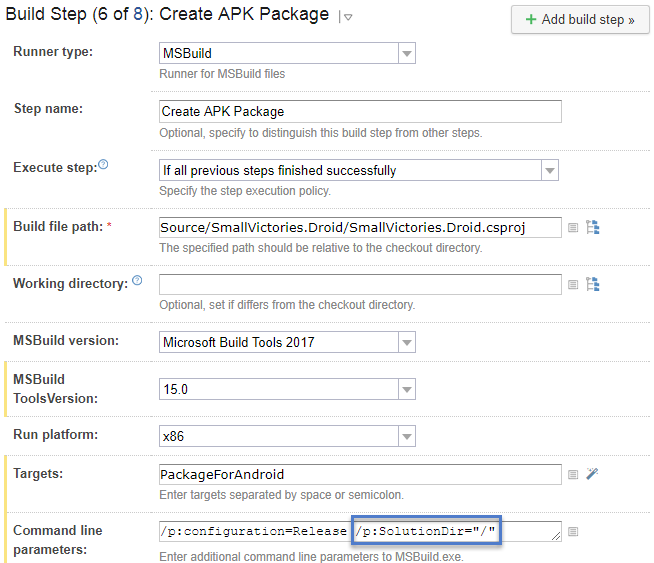
Notice the “*Undefined*Tools” in the directory path. To fix this step you need to add /p:SolutionDir="/" to the command line. So now the build step looks like:
You can find more about the bug in this GitHub issue and more about the fix in this blog post.