Today I Learned How to Fix Illegal Characters in Path Error with TeamCity and RealmDB

When building a Xamarin application one step is to build the Android APK file.  This is a MsBuild step in TeamCity that looks like:
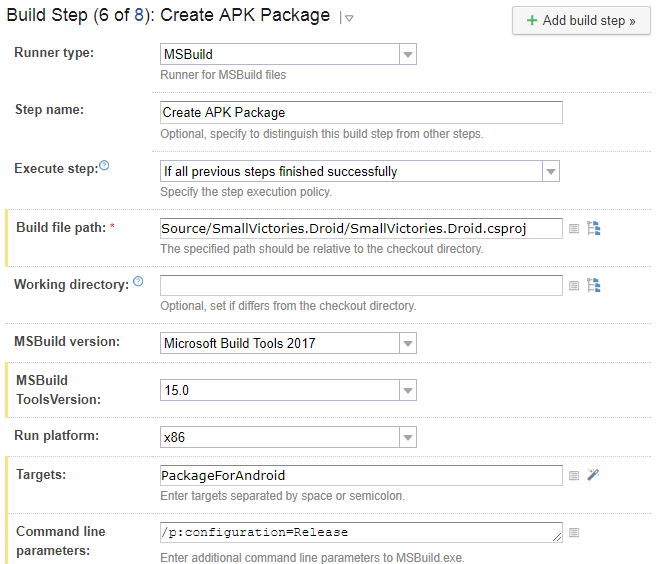
TeamCity Create APK Package Build Step

This step generates the following error:

[15:55:53][Source\SmallVictories\SmallVictories.csproj] CopyRealmWeaver
[15:55:53][CopyRealmWeaver] CopyRealmWeaver
[15:55:53][CopyRealmWeaver] Copy
[15:55:53][Copy] Creating directory "*Undefined*Tools".
[15:55:53][Copy] C:\BuildAgent\temp\buildTmp\.nuget\packages\realm.database\2.1.0\build\Realm.Database.targets(28, 5): error MSB3021: Unable to copy file "C:\BuildAgent\temp\buildTmp\.nuget\packages\realm.database\2.1.0\build\..\tools\RealmWeaver.Fody.dll" to "*Undefined*Tools\RealmWeaver.Fody.dll". Illegal characters in path.
[15:55:53][Step 6/8] Error message is logged

Notice the “*Undefined*Tools” in the directory path.  To fix this step you need to add /p:SolutionDir="/" to the command line.  So now the build step looks like:

[Read More]

Notes on Fixing Incomplete Bitcode Error in TeamCity Automated Objective-c Builds

Notes I took while trying to fix the Incomplete Bitcode error in submission bug.  Not sure if it’s fixed yet as I haven’t tried submitting an app to the App Store yet.  Hopefully someone else will try it and confirm it’s fixed.

In summary when submitting an app to iTunes Connect that has the XPlugins.iOS.BEMCheckBox the user got the following error:

ERROR ITMS-90668: “Invalid Bundle Executable. The executable file ‘InstantApp.BoostOrder.Customer.Touch.app/Frameworks/BEMCheckBox.framework/BEMCheckBox’ contains incomplete bitcode. To compile binaries with complete bitcode, open Xcode and choose Archive in the Product menu.”

[Read More]

Today I Learned How to Run NUnit Tests for a .NET Core Project in TeamCity

In TeamCity you can’t use the usual NUnit Runner to run .NET Core unit tests.  At least I couldn’t get it to work.  I’m sure this will be fixed in the future but for now the below works for me.  I got lots of inspiration from this TeamCity blog post.

For this example I’ll use the NConstraints project.  It contains a .NET Standard project (SaturdayMP.Constraints) that we want to test and two .NET Core Test projects (SaturdayMP.Constratints.Test and TestClient).

[Read More]

Today I Learned How to Automate Objective-c Builds in TeamCity

Several months ago I discussed how to manually build an objective-c project so it can be consumed by a Xamarin Binding Project.  In this post I show how to automate the building of the objective-c project.  In my case I need to automate the building of the BEMCheckBox project but hopefully you can generalize this specific example for your own needs.

For this post I’ll assume you have a TeamCity server setup along with a TeamCity build agent on a Mac.  For help installing a TeamCity server see the official documentation.  For help installing a Mac build agent please see my previous post and/or the official documentation.

[Read More]

Today I Learned How to Install a TeamCity Build Agent on a Mac

When I was first figuring out how to port the BEMCheckBox to Xamarin I built the framework manually.  This is obviously not a good long term solution so I set about figuring out how to automate the build.  The first step was to install the TeamCity build agent on the Mac.  The official TeamCity documentation on how to do this can be found here.

First a little bit about my setup.  My TeamCity server is on a Azure virtual machine (i.e. it’s in the cloud).  My Mac build machine (Mac Book Pro) is sitting beside me in my basement office.  Some of the steps below might differ if your setup is different, such as having the TeamCity server and Mac build machine on the same network.

[Read More]