Today I Learned how to Copy a Putty Key From Windows to a Mac

You created a private Putty key on Windows workstation to access a remote service but now you need to access that same remote service from a Mac workstation.  In my case I need to access the same Git repository from both machines.  I created the key using the steps outlined in a previous post.

Quick aside: Before we continue you need to decide if it’s better to copy your private key or just generate a new private/public key pair on the Mac.  If the service you are connecting too does not support multiple keys then you have now choice but to copy it.  Assuming that the service does allow multiple keys then consider these security implications of copying your private key.

[Read More]
Categories: network today-i-learned  Tags: mac putty ssh 

Today I Learned How to Create a Key Pair Using PuTTY

I recently had to generate a private/public key pair to access a Git repository.  While I’ve done this several times before I never do it enough to remember all the steps so this time I wrote it down.

Since my primary workstation runs Windows I use PuTTY to generate the keys.  If you thought PuTTY was just a SSH client then you are not alone (e.g. I used to think that too).  PuTTY’s unofficial tag line should be:

[Read More]

Today I Learned how to Install PostgreSQL in Ubuntu

For an upcoming project I’m thinking of using PostgreSQL.  I’ve heard lots of great things about PostgreSQL in the past but have been too scared lazy busy to try it.

What changed my mind was JetBrains DataGrip database client.  I’m sure there are other PostgreSQL clients but DataGrip is included in my JetBrains subscription so why not give it a try.   I’m a sucker for GUI database clients.  As a generalist it’s too hard to remember all the command lines for each individual database.  Plus it’s really hard to view more then a few rows or columns of data in the command line.

[Read More]

Today I Learned How to Fix Illegal Characters in Path Error with TeamCity and RealmDB

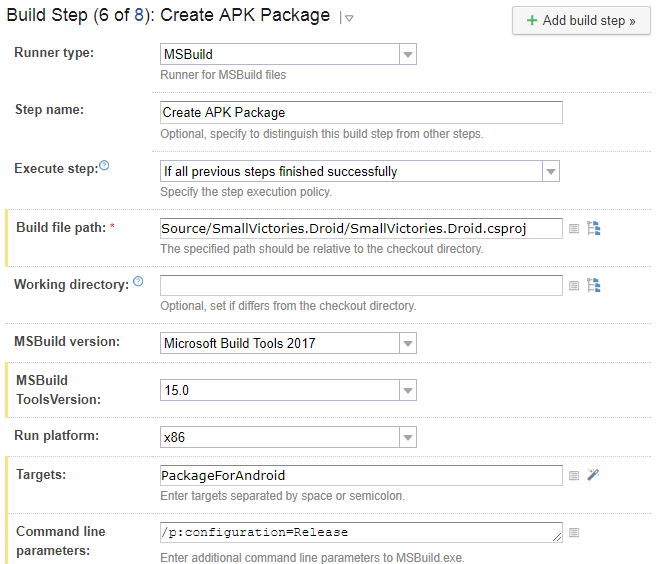
When building a Xamarin application one step is to build the Android APK file.  This is a MsBuild step in TeamCity that looks like:

TeamCity Create APK Package Build Step

This step generates the following error:

[15:55:53][Source\SmallVictories\SmallVictories.csproj] CopyRealmWeaver
[15:55:53][CopyRealmWeaver] CopyRealmWeaver
[15:55:53][CopyRealmWeaver] Copy
[15:55:53][Copy] Creating directory "*Undefined*Tools".
[15:55:53][Copy] C:\BuildAgent\temp\buildTmp\.nuget\packages\realm.database\2.1.0\build\Realm.Database.targets(28, 5): error MSB3021: Unable to copy file "C:\BuildAgent\temp\buildTmp\.nuget\packages\realm.database\2.1.0\build\..\tools\RealmWeaver.Fody.dll" to "*Undefined*Tools\RealmWeaver.Fody.dll". Illegal characters in path.
[15:55:53][Step 6/8] Error message is logged

Notice the “*Undefined*Tools” in the directory path.  To fix this step you need to add /p:SolutionDir="/" to the command line.  So now the build step looks like:

[Read More]

Today I Learned The Final Backslash is Important in Apache HTTPS Redirects

Lets start with the bug:

When requesting a download link via the Downloads page the link that is sent via e-mail is invalid.  It is missing a slash.

  1. Enter a e-mail on the Downloads page (https://www.saturdaymp.com/downloads) that has already purchased Mini-Compressor.

  2. E-mail should be sent but the link in the e-mail is incorrect.  For example the link I got was:

https://www.saturdaymp.comdownloads/show_products?link=blahblahblah

There should be a slash after the https://www.saturdaymp.com.

But when I looked closer at the actual e-mail, the link was correct.  It looked like:

[Read More]
Categories: today-i-learned  Tags: apache https