Today I Learned How to Handle Local Notifications in Xamarin on Android

In my previous example I detailed how to schedule notifications in Xamarin on Android but didn’t show the Xamarin Forms application reacting to that specific notification.  Let’s fix that.

First override the OnNewIntent method in the MainActivity.  We override this method so notifications will work if the application is currently running or is stopped and the notification started the application.  In the OnNewIntent method you put code that makes sure it’s a notification you want to respond to then extracts any needed information from the notification.  An example is below:

[Read More]
Fixing MSBuild not Exiting

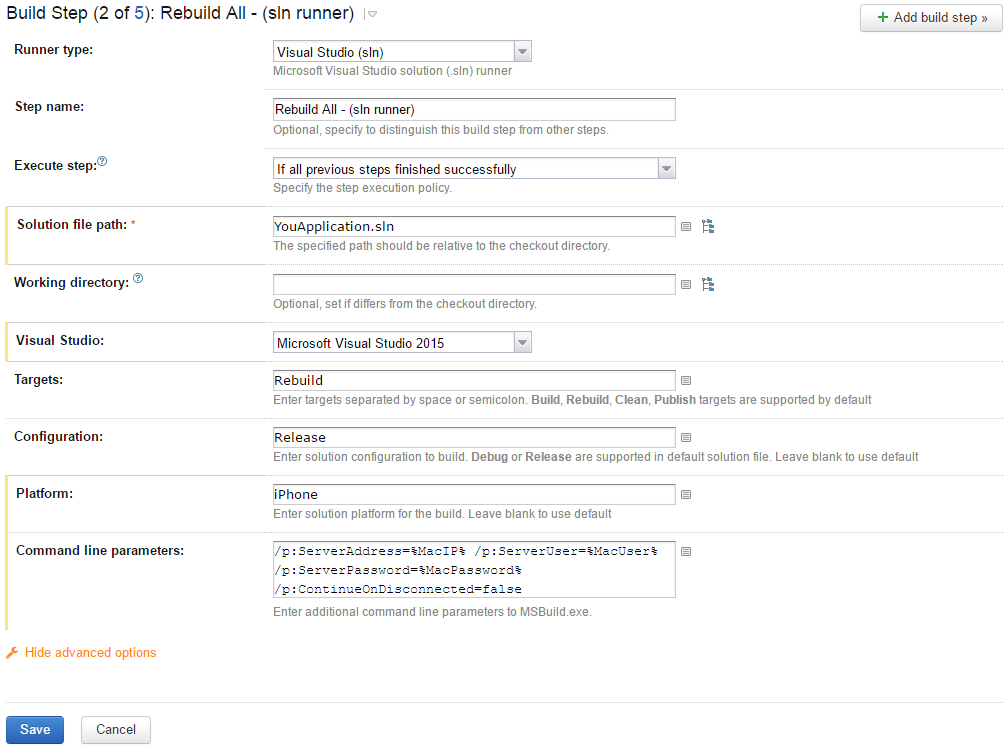
After upgrading to Visual Studio Xamarin 4.1 from 4.0 our TeamCity build suddenly stopped working.  Actually it was working but won’t stop working.  The build would get hang after rebuilding out solution to create the IPA file.

The step in question looked like:

Solution Runner That Hangs

The TeamCity logs looked like:

[09:23:28][Foo\Foo.iOS\Foo.iOS.csproj] _SayGoodbye
[09:23:28][_SayGoodbye] SayGoodbye
[09:23:28][SayGoodbye] Compute signature for bin\iPhone\Release\FooiOS.app

The build would also hang if I logged into the build machine and ran the msbuild via the command line.  However, the build would not hang if built via Visual Studio.

[Read More]

Connect to Android Emulator from VirtualBox

I do all my development inside virtual machines.  This allows me to keep separate development environment for different projects and clients.  I wanted to keep this tradition for developing mobile applications but that turned out to be a bit of challenge.

The Xamarin Android Player and the Genymotion emulators both use VirtualBox to emulate the Android phone or tablet.  This works great if you don’t develop in a virtual machine.  If you develop inside a virtual machine you run into a major problem:  you can’t run a virtual machine inside a virtual machine.

[Read More]

Display a Section only on the First Page in a Crystal Report

To display a section only on the first page but not on other pages right-click the section in question and choose Section Expert.

Crystal Reports Section Expert

Click the x-2 button to the right Suppress (No Drill down) and add the following formula:

Crystal Reports Format Formula Editor Now this section will only appear on the first page.  Your welcome.

Categories: code-examples  Tags: crystal-reports 

Visual Cut Doesn't Like to Waste Space

ScissorsJust a heads up that Visual Cut is really picky about command line arguments.  Visual Cut does a bunch of stuff with Crystal Reports but in my current project it is just used to print reports on demand.  The printing is done via a command line call to Visual Cut.

Reading the documentation and looking at the existing code the arguments seemed pretty straight forward, just standard key/value pairs in format “Key:Value”.  For example:

[Read More]